|
|
| من: SilentEyez (الرسالة الأصلية) |
مبعوث: 15/08/2018 15:40 |

Click the header to go to the tutorial.
If you have any questions about this tutorial, please ask them on this thread.
And don't forget to show off your results when finished!  |
|
|
|
|
|
|
من: justjam |
مبعوث: 16/08/2018 22:44 |
Thanks timber, I love those Daum dolls!
I read over my post above several times and now I see a spelling error, LOL I meant to type "existing " instead of "exicting".
I am so bad about that!
The name "kse_stellarbling" sounds good to me. I'll name mine that.
The easiest way to create a new SBP preset is to start with an existing preset and play around with the different settings to find one you like. I have made a few of my own and added different bmps to use in the enviornments and textures folder.
As to the kerning to floating text, I don't know of any way to edit it after closing the Text Entry dialog box. I'll play around and see what I can find.
Timber,I love your animated tag.  I like the look of selection contracted by 1. Now I get to play some more. 
|
|
|
|
جواب |
رسائل 10 من 23 في الفقرة |
|
|
من: justjam |
مبعوث: 16/08/2018 23:19 |
Timber as far being able to edit floating text, the answer is no.
The word exit below should be edit.
Here is what the PSP 8 User Guide says:
page 305 PSP 8 User Guide
Floating (Raster) Creates raster text that is a floating selection. You cannot exit (sic) raster text, so use this type when you know that the words and formatting will not change. Use raster text when you want to apply raster-only tools (such as the Paint Brush) or commands (such as applying a 3D effect).
It’s best to create raster text on a new raster layer. That way, you can easily select the text and make changes such as stretching it with the Deform tool.
When Paint Shop Pro defloats the raster text selection (such as when you click another tool), the raster text is merged with the underlying raster layer. If a vector layer is active, Paint Shop Pro creates a new raster layer.
|
|
|
|
جواب |
رسائل 11 من 23 في الفقرة |
|
| I am so upset that I can no longer make my Stellar Bling ... *sigh* Not too long ago, I wanted to give it a go and make some bling text and then I noticed that my SBP looks different now. It looked confusing and I was having trouble getting around.
Well, that is not the only thing. I am so clueless as how to this thing works *huuu* I do not know but I think even how the folders are set up/named are different too?? It had been so very long since I had used SBP.
Either way, I have clicked and searched through folders (in My PSP Files in My Documents and also in the Jasc files) and cannot seem to find the bmp/jpg files that I used to be able to see.
Did I do something wrong ... A few hours ago, I uninstalled the trials for 2018/X8 and I remember it said something about it removing all files that go with it. I am now thinking that is where everything went (though doubt it) lol
And I do not even have my own preset "kse_stellarbling.q5q" *bop*
|
|
|
|
جواب |
رسائل 12 من 23 في الفقرة |
|
|
من: justjam |
مبعوث: 10/08/2021 17:44 |
Oh no Karla! I uploaded the kse_strallarbling and bmps that I saved to files and documents here at TT.
Hope that helps. I have no idea why the looks of your SBP have changed.
Check out this site for the controls in SBP. Hope you get it figured out.
Judy |
|
|
|
جواب |
رسائل 13 من 23 في الفقرة |
|
| Oh, Judy, you are a lifesaver (candy lol)!! Thank you so much for the files - saved them and tested it. IT WORKED ♥
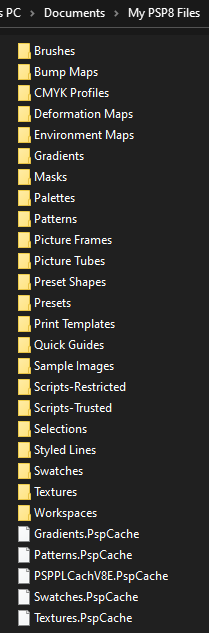
As I am typing this, I am remembering that not too long ago my laptop updated. I am thinking it changed some things around ... I do not have an Environments and Textures folder any more. Let me get a screenshot ...
In the folders for Bumps, Environments, Textures ... it is empty. In my C drive PSP8 files, there are files in them - just not the ones needed for my script (no Cove or Turbulence for some reason). The Worlds gone mad lol
|
|
|
|
جواب |
رسائل 14 من 23 في الفقرة |
|
|
من: justjam |
مبعوث: 11/08/2021 02:52 |
Karla, Look in the folder where your SBP plugin is located. Open the SBP folder and there should be a folder titled. "Environments and Textures".
This is the location you need to open in your SBP. |
|
|
|
جواب |
رسائل 15 من 23 في الفقرة |
|
|
من: justjam |
مبعوث: 11/08/2021 02:58 |
I had another play.
I used the Feeling Lovely font at size 92. I contracted by 1 and set my noise as Uniform, mono, 50/45/40. Thanks again for the tut and the preset!
|
|
|
|
جواب |
رسائل 16 من 23 في الفقرة |
|
| First off, OMG, Judy!! That looks fabulous (♥_♥) I loved that you tried it with a different font!! I wonder if it will look good with some Constellation sparkles ♥
And lol, I feel so dumb ... THANK YOU for the BIG help with this. I now see the LIGHT (bling). Now, I can live happily lol
|
|
|
|
جواب |
رسائل 17 من 23 في الفقرة |
|
|
من: justjam |
مبعوث: 11/08/2021 03:54 |
LOL karla, you are very welcome. I have noticed that when I run my CCleaner to remove cookies, etc., it changes my SBP folder settings and I have to re-direct it. So, don't feel alone, I've been there.
Can't wait to see your results.
|
|
|
|
جواب |
رسائل 18 من 23 في الفقرة |
|
I gave it a go with the same font, Judy and I added the Constellation settings in Allisons Addictions "Ripples" tutorial. 1/1986/7700 (each frames sparkle size). It is so BLINDY lol And the below I recolored to 197/200 hue & saturation.
|
|
|
|
جواب |
رسائل 19 من 23 في الفقرة |
|
|
من: justjam |
مبعوث: 11/08/2021 04:12 |
Woo Hoo These are gorgeous! Thanks for sharing your settings. |
|
|
|
جواب |
رسائل 20 من 23 في الفقرة |
|
Lol, I was just testing it out and thought "oops, maybe too much?". Maybe a different setting will look really nice. I loved the way you added Noise to yours. It is perfect for your name tag ♥ The colorized one was not really planned, I just chose the color setting last used lol
Thank YOU for sharing yours with a different font. I hope the other gals here will try it out too :)
|
|
|
|
جواب |
رسائل 21 من 23 في الفقرة |
|
|
Yay, I was able to do my own tut after so very long! I did not realize the numbers and punctuations / characters were also starry! I typed this as: *karla*. It is an experiment to see what it would look like.
|
|
|
|
جواب |
رسائل 22 من 23 في الفقرة |
|
Looks beautiful!!!!! i love it! |
|
|
|
جواب |
رسائل 23 من 23 في الفقرة |
|
|
Thank you, Marycielo! Here is info on the "bling text" I made.
~~~~~~~~~~~~~~~~~~~~~~~~~~~~~~~~~~~~~~~~~~~~~~~~~

Use any font you like. In example, Bergstena Decorated @ 92
Foreground & Stroke Properties color: #D27508 (dark gold)
Background & Fill Properties color: #F8A031 (light gold)
1. Type your text as Raster and do not deselect.
3. In the Layers palette, there will be a highlighted layer. This layer has the "Contract Selection".
4. Add a Noise effect to that layer. I used these settings:
Uniform, 100, Monochrome.
5. Copy Merged, go to Animation Shop and CTRL+V.
6. Go back to PSP, undo Noise effect and add the same Noise effect settings. There is no need to change the Noise % (number).
7. Copy Merged and go back to Animation Shop, and paste After Currect Frame (Shift+CTRL+L).
8. Repeat steps #6 and #7.
9. Optimize (Shift+Z) your work with the following settings:
In the Colors tab: 255 colors, Optimized Octree, Error Diffusion.
In the Partial Transparency tab: 39 (15.3%), white
And that's it!
Your text will have a goldish border, which is not too noticeable. This is part of the pretty bling look with the silver / platinum.
|
|
|
أول
سابق
9 a 23 de 23
لاحق
آخر
|